A permit deletion process is added in the coming release of R2026e. There are cases that a permit added turns out to be incorrect later. Here are the steps to delete a permit:
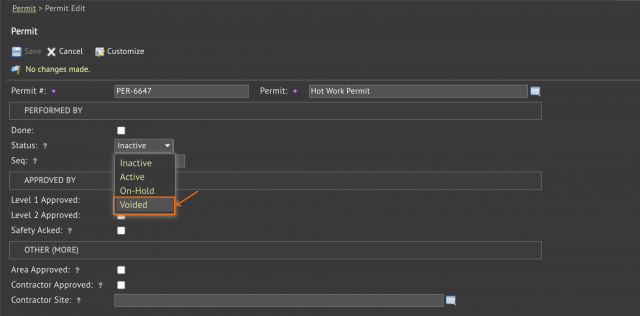
- A new status "Voided" is added to make a permit voided.
- Only users with level 1 or level 2 permission for a permit can change its permit status to "Voided".
- The first step is to edit a permit and modify its status to "Voided" (Work Order | Codes | Permits). For a general permit, one needs to go to its data view for editing.
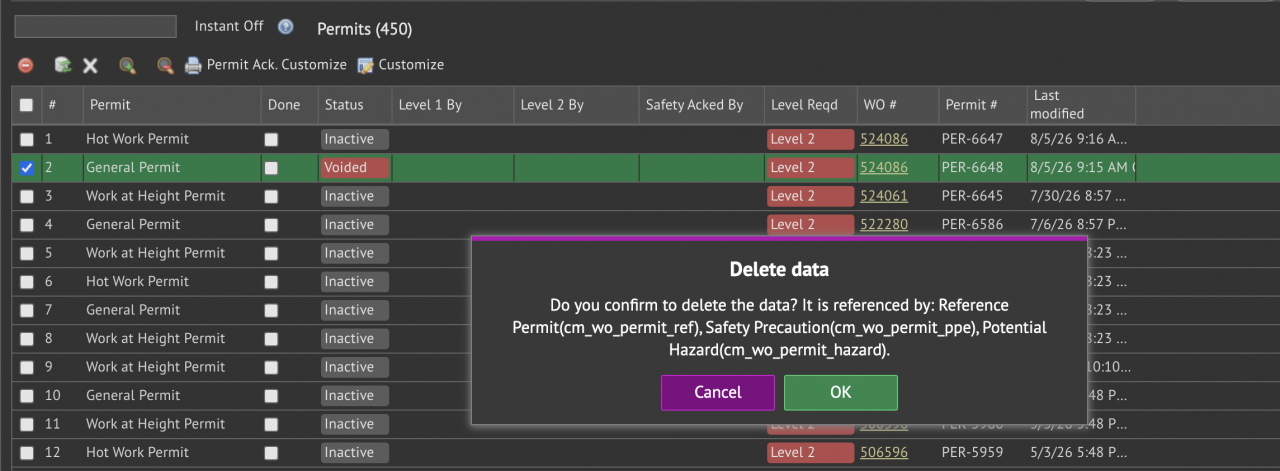
- Once a permit is voided, the deletion menu of permit lists may be used to delete a permit.
- Confirm the deletion prompt to commit permit deletion.
Additional Resources
- Introducing work Permit
- Integrating Permits into the Work Order Lifecycle
- Work Permits Notifications
- New Feature: Work Permit Approval and Status Tracking
- New Feature: Permit Requirement in Work Order Creation
- New Feature: General Work Permit Form Digitization
- Work Order Module Training
- User Guide and Admin Guide (customer account required)
- Calem Enterprise Training Site
- Calem Enterprise Blogs
- Calem Enterprise demo