Clay's Blog

These are the official blogs about CalemEAM.
Mar
29

Multiple Lines for a Service or Repair Item in a Requisition/PO


Multiple lines of a service or repair item can be added to a requisition or purchase order in Calem release R2023a available in March 2023. For service item, each additional REQ or PO line of the same item needs to have a different cost center.For repair item, each additional REQ or PO line of the same item needs to have a different ...
Continue reading
  3254 Hits
3254 Hits
Mar
21

How to Identify Network Issues from Calem Web


Network issues such as internet connection outage will cause Calem to display an error message shown below. The error message indicating a network issue. To confirm the network problem you may use browser developer tools to confirm. Chrome is used as an example. Edge, Safari and Firefox all support developer tools.Go to Chrome's Opti...
Continue reading
  3197 Hits
3197 Hits
Mar
16

Enhancement to License Seat Reporting


License seat reporting has been improved in the coming release of R2023a: License seats export to Excel: Admin | Open | User Seat User report includes the "License" flag for users with a license assigned: Organization | Report | User ListingQuery on the "License" flag (set to 1) to show all users with license assigned.  Additional Re...
Continue reading
  2928 Hits
Tags:
2928 Hits
Mar
12

Multiple MAC Addresses for Assets


Multiple MAC addresses are available for an asset in the coming release of Calem R2023a. It allows a user to find an asset by its mac addresses. Menu path: Asset | Report | MAC addresses  MAC addresses can be managed from Asset form: Menu path: Asset | Asset List | Asset | Contract Tab | MAC Address list  MAC address info is shown in...
Continue reading
  3754 Hits
Tags:
3754 Hits
Mar
07

Dashboard for Purchase Orders and Receipts


 A dashboard of purchase orders (POs) and receipts are available for budgetary purposes in the coming release of R2023a. Menu path: Dashboard | Inventory | PO and ReceiptsMonthly POs and Receipts are visualized in bar charts and list views.Use "Year" menu to set a year for reporting.Multi-site drill-down is supported.Drill-down to POs and rece...
Continue reading
  3602 Hits
3602 Hits
Mar
03

Calem AI: Asset Failure Prediction by AI (artificial intelligence)


This blog is deprecated. See this blog for asset failure prediction. Artificial Intelligence (AI) is a technology for tackling complex problems such as answering questions. For instance, I got the following response when asking ChatGPT, an AI powered chat bot, "Why AI": Why AI by ChatGPT AI, or artificial intelligence, has ...
Continue reading
  4227 Hits
4227 Hits
Mar
02

How to Update User Profile Assignments in Bulk


User access rights are managed in Calem by ACL Profiles. It is efficient to manage user profiles in bulk for organizations with many users. This is done through bulk data export and import (see this blog).  1. Export Profile Assignment The first step is to inventory the profile assignments. The exported assignments are then used to prepar...
Continue reading
  3197 Hits
Tags:
3197 Hits
Feb
07

How to Use Authorization for Expenditure (AFE)


Authorization for Expenditure (AFE) is added in the project module in release R2023 available in February 2023. The process of AFE is outside of Calem. AFEs including approved totals are stored in Calem for tracking cost in purchase orders (PO). 1. AFE An AFE is identified by an AFE number (AFE #). It is referenced in projects, ...
Continue reading
  5873 Hits
Tags:
5873 Hits
Feb
05

How to Assign Buyers to Vendors


In the coming release of Calem R2023 one can assign buyers to vendors. Calem will auto-fill buyers based on the buyer assignment.  Menu path: Purchase | Open | Vendor BuyerVendor site and Buyer are requirement for an assignment.The Site column is the PO site. It is optional.Set a site for a buyer to be for a PO site.Leave the site empty for a ...
Continue reading
  2847 Hits
2847 Hits
Feb
02

Why Adding the Classic Mint Theme


The Classic Mint theme is available in the coming release of R2023. The goal is to allow users who are familiar with the Classic theme to have the same experience with the Mint theme. Here are the key points for the Class Mint theme: It has the advantage of the screen layout of the Classic them and the modern look of the Mint th...
Continue reading
  2997 Hits
Tags:
2997 Hits
Feb
02

A Note of Asset Lifespan Alerts


Asset lifespan alerts are available in the coming release of Calem R2023. Work orders may be created at lifespan points such as 80% and 100%. For instance, when an asset exceeds its lifespan (screenshot below), a high priority work order may be created to alert maintenance supervisors.  1. Define Lifespan Alerts The first step is to ...
Continue reading
  3328 Hits
Tags:
3328 Hits
Feb
01

The Timeline View for Assets


 The timeline view of assets is available in the coming release of Calem R2023. It provides a quick overview of an asset. It is available for all themes: dark, mint, and classic (screenshots below). A timeline view includes the following components. A headline of the tag number, priority, status and the short note.% of lifespan based on the li...
Continue reading
  3433 Hits
Tags:
3433 Hits
Jan
28

The Timeline View of Work Orders


The timeline view of work orders is available in the coming release of Calem R2023.  It provides a quick overview of a work order. It is available for all themes: dark, mint, and classic (screenshots below). A timeline view includes the following components. A headline of the order number, priority, stat...
Continue reading
  3107 Hits
Tags:
3107 Hits
Jan
20

How to Add Thousands of Images to Assets


It is intuitive to display an asset image when viewing an asset. An image can be uploaded by the menu "Attach Photo" in the asset form.  1. Drag and Drop Not Practical Calem provides a drag and drop screen to add more than one image and file to Calem as shared docs (see this blog), or as attachment to an object (asset, inventory, etc).  H...
Continue reading
  3177 Hits
Tags:
3177 Hits
Jan
14

How to Query Meter-Triggered Work Orders


Work orders can be generated by meter readings based on meter triggers in Calem. In the coming release of Calem R2023 saved queries "Meter Triggered" are provided to identify them. You may build your own saved searches by the use of "Meter Triggered" checkbox added in release R2023. Show "Meter Triggered" column in a work order list. The colum...
Continue reading
  2830 Hits
2830 Hits
Jan
02

Upload Files When Creating Work Orders


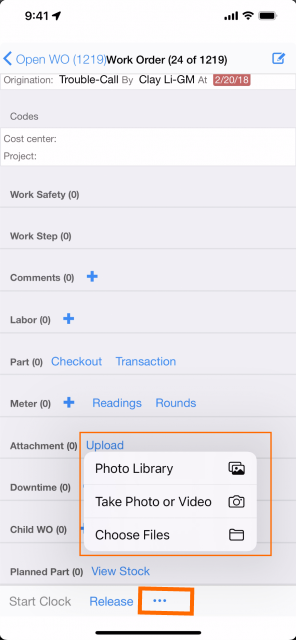
In the coming release of Calem R2023 one can upload files at the work order creation screen.  The feature is available to the creation screens of Work Orders, Service Requests, and Changes from web. In Calem Mobile the feature is available for Work Orders and Service Requests.Previously, pictures and files can be uploaded after ...
Continue reading
  2690 Hits
Tags:
2690 Hits
Dec
30

The Dreadful Red Warning Blocker in Calem


It was Friday and the last working day of the year of 2022, the home page of Calem website (1st screenshot below) didn't show. Instead, a red warning blocker (2nd screenshot below) showed up when visiting Calem website (calemeam.com). The red blocker page also showed when visiting Calem cloud service such as demo....
Continue reading
  7078 Hits
Tags:
7078 Hits
Dec
13

How to Set Up Multiple MAPs in Calem


Multiple MAP APIs are available in the coming release of Calem R2022g in December 2022. They include Google Maps, Esri ArcGIS, Open Street Maps and Floor Plans. Work orders, assets or locations can be visualized in various maps configured in Calem.  The screenshot below shows work orders as markers and its clusters in an Ar...
Continue reading
  3431 Hits
3431 Hits
Nov
06

A Note of WO Scheduling and Release


1. WO Scheduling Status WO scheduling status is refactored in the coming release of R2022f. It is a colored field in Open WO List. One may use this field to review and schedule/assign work orders. The scheduling status is "Scheduling" in a work order list.The status takes a value of "Fully" (fully scheduled); Partially (partially scheduled); "None"...
Continue reading
  3414 Hits
Tags:
3414 Hits
Nov
02

Duplicate Service Request Prompts


A prompt for potential duplicate service request is added when an SR is added manually. Open SRs with matching asset/location and category are potential duplicates and will be listed if found. The feature of duplicate check is available for work orders and inventory items. Click "No Duplicate" to tell Calem it's not a duplicate. A ne...
Continue reading
  3601 Hits
3601 Hits

By accepting you will be accessing a service provided by a third-party external to https://calemeam.com/