Calem Blogs
Meter Monitoring: Know When Automated Meters Go Quiet
CalemEAM now tells your team when an automated meter stops sending readings, so a silent device is caught within a day instead of weeks later, in the coming release of R2026i (December 2026).
Meters connected through MQTT or OPC-UA are meant to run unattended. That is their value, and also their risk. A broker goes down, a sensor loses power, or a node ID changes on the OPC-UA server, and the readings simply stop. Nothing errors in Calem; the meter just keeps showing its last value.
Meanwhile, everything downstream keeps trusting it: meter-based PMs don't trigger, condition thresholds don't fire, and asset health and failure-prediction models work from stale data. Meter Integration Monitoring closes that gap.
What's new
Once a day, Calem checks every automated meter. If a meter hasn't delivered a reading in the last 24 hours, the asset monitors for that site get an email.
Alerts are grouped: one email per site, not one per meter. Each email lists the meters that have gone quiet in a table:
Column | What it tells you |
|---|---|
Meter # | Which meter stopped reporting |
Asset Tag | The asset it measures |
Location | Where to send someone to look |
Channel | MQTT or OPC-UA, so you know which integration to check |
Last Auto Reading | When Calem last received data, or "Never" |
How it works
The check runs automatically every day, right after work order generation. No extra scheduling is needed.
- Find the automated meters. A meter counts as automated when its MQTT device path or its OPC-UA node ID is filled in.
- Look for recent readings. Calem looks for at least one MQTT or OPC-UA reading received in the last 24 hours.
- Notify by site. Meters with no readings are grouped by their asset's site, and each site's asset monitors get one email.
The window is measured by when Calem received the reading, not by the device's own timestamp. The question it answers is "is Calem getting data?", and a device with a wrong clock can't hide a broken feed.
A few rules keep the alerts meaningful:
- Manual readings don't count. A technician entering a reading by hand doesn't mask a dead sensor.
- Voided readings don't count.
- Disabled meters are skipped.
- New meters get a grace day. A meter set up today isn't flagged before it has had a chance to report.
- Failed deliveries are caught too. If a reading arrives but can't be matched to its meter, the meter still shows as missing, which points straight at the mapping problem.
Opting a meter out: No Monitoring
Some meters are expected to go quiet. A seasonal pump, equipment out for overhaul, or a sensor being replaced shouldn't trigger an email every morning.
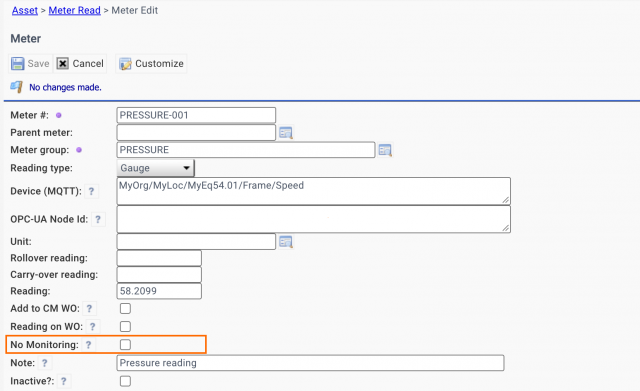
For these, check No Monitoring on the meter. Calem stops including it in the daily check until the box is cleared. It's one flag for all channels: it applies to MQTT, OPC-UA and any integration channel added in the future, so there's no separate setting per integration.
Additional Resources
- Bulk Update by Data Export and Uploa
- Calem Integration 1: Email & Misc Integration
- Calem Integration 2: REST API
- Calem Integration 3: Custom Triggers
- Calem Integration 4: Subscribing to Data Changes via REST API
- Calem Integration 5: Upsert REST API
- Calem Integration 6: Inbound Inventory Transactions
- Calem Integration 7: Asset Integration with MQTT
- Calem Integration 8: Device Integration via OPC/UA
- Calem Enterprise Customization
- Custom Fields and Forms for User Skills
- List View Customization
- User Guide and Admin Guide (customer account required)
- Calem Enterprise Training Site
- Calem Enterprise Blogs
- Calem Enterprise Demo
About the author

By accepting you will be accessing a service provided by a third-party external to https://calemeam.com/